IR302 Unauthorized Devices Blocking
Problem Scenario
Client has
a IR302 router, and an authorized card reader and a controller are connected to
the router, for regular operation.
But
recently there are two more unknown devices connected to the router, and they
consume some internet data. Client wants to block them.
Solution
Step 1: find the devices
- In the Internet Browser address bar, enter
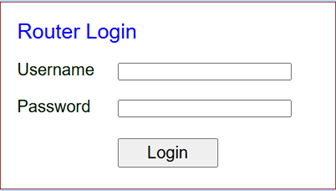
192.168.2.1 (default router Web UI address). It will prompt the Router Login
as shown below
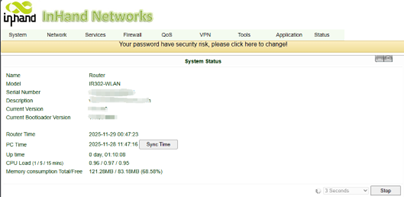
- Use your username and password to login. Unless changed, the default username and password are printed at the back of the IR302 router device. For example, username/password: adm/123456. If login successes, it will come to this interface:
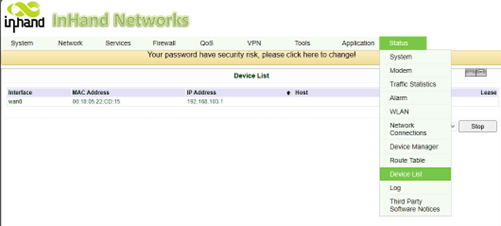
- Navigate to Status -> Device List to see what devices are connected to your router currently, as shown below, the write down the MAC addresses of those two unauthorized devices.
*BEFORE START
Please make sure you have the Firmware 3.5.68 version or later to enable blacklist or whitelist feature.
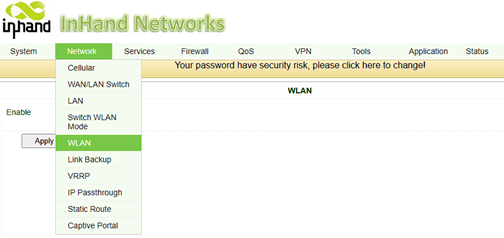
- Blacklist or whitelist the devices by navigating
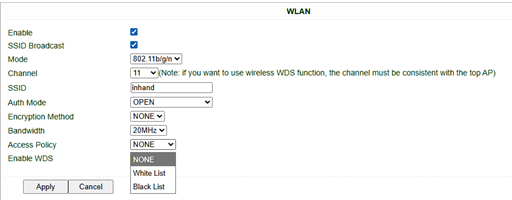
to Network -> WLAN interface as below, then check Enable box.
- Then you will see the interface like this:
- Change Access Policy from None to White
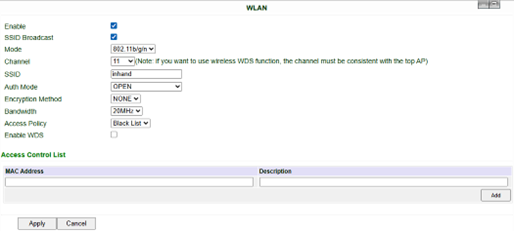
List or Black List as your preference:
- Then after entering the MAC address of one unauthorized device, click Add button at the bottom right corner. Repeat to add more devices.
After all devices added, click Apply button to apply the changes. The new rule will be in effect immediately.
* Important note
This method uses Blacklist to
block the access of the unauthorized devices. If Whitelist is
preferred, please add the authorized devices MAC addresses only.
Topic Participants
alfred.wang