Predictive Maintenance and Remote Management for Distributed Industrial Assets
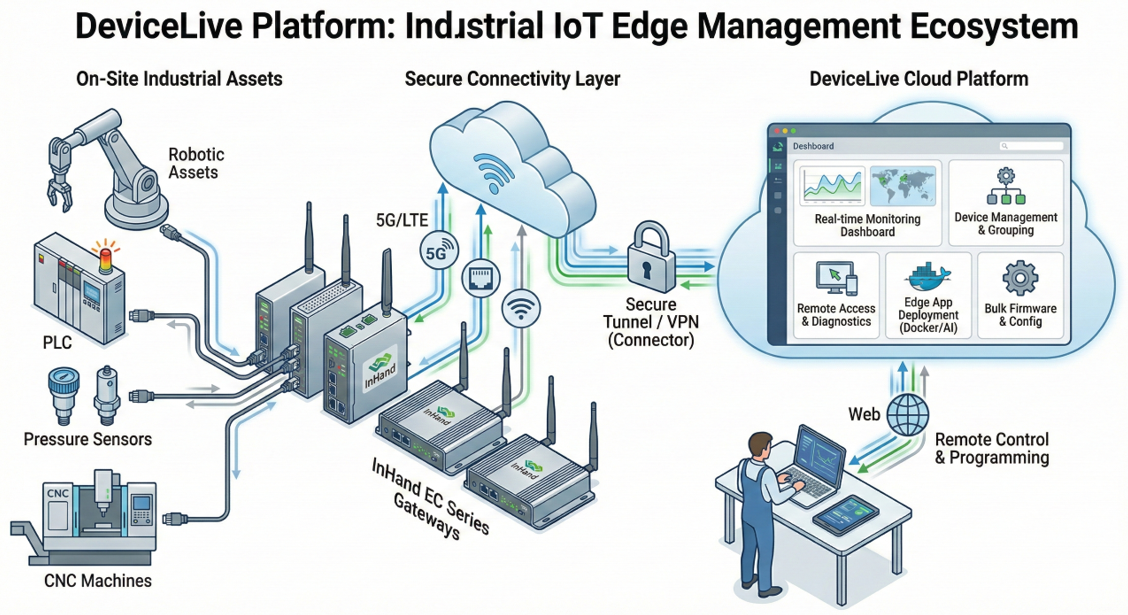
A manufacturing company operates multiple production facilities across different regions. Each facility uses numerous industrial IoT (IIoT) devices (gateways, controllers, PLCs, sensors) for automation and monitoring. The company faces several challenges:
- High Maintenance Costs: Manual on-site inspections and troubleshooting are time-consuming and expensive.
- Unplanned Downtime: Equipment failures lead to production line stoppages, causing significant revenue loss.
- Inefficient Management: Difficulty in centrally monitoring device health, network status, and application performance across all sites.
- Slow Deployment & Updates: Deploying new applications or updating firmware for edge devices is a slow, manual process at each site.
2. Solution with DeviceLive
The company deploys InHand edge intelligent hardware (e.g., EC series routers/gateways) at each facility and uses the DeviceLive cloud platform for unified management.
3. Implementation & Workflow
Phase 1: Zero-Touch Deployment & Unified Onboarding
- Engineers install InHand hardware on-site and connect it to the local network (Ethernet, Cellular, or Wi-Fi).
- In the DeviceLive console, administrators add devices by entering their serial numbers.
- Devices automatically connect to the platform and synchronize, enabling immediate cloud-based visibility.
Phase 2: Organization & Group-Based Management
- Administrators create a multi-level organizational structure in DeviceLive (e.g., root > Region A > Factory 1).
- Devices are assigned to their respective organizational units. User roles (System Admin, Device Full Access, Read Only) are assigned to facility managers and technicians, controlling their data access and operational permissions.
- Devices with similar functions (e.g., all PLC gateways in Factory 1) are added to a Group. This enables bulk operations.
Phase 3: Real-Time Monitoring & Predictive Maintenance
- On the DeviceLive Overview and Devices dashboards, operations teams monitor real-time status of all devices (online/offline, CPU, memory, network uplink).
- Alert rules are configured for critical conditions:
- "Disconnect from Platform" for more than 5 minutes.
- "Cellular Signal" drops below a threshold.
- "License Expiring Soon" (30-day warning).
- Alerts are sent via Email or SMS to designated technicians.
- The Map feature provides a geographical view of all asset locations and statuses.
Phase 4: Remote Diagnostics & Control
- When an alert is triggered (e.g., a gateway goes offline), a technician uses DeviceLive's Remote Access feature to securely log into the device's local web interface from headquarters.
- Using Remote Commands, the technician can Reboot the device or, if needed, perform a Restore to Factory (with configurations reapplied later).
- For deeper network issues, the technician uses built-in diagnostic tools or analyzes Connection History and Cellular Signal trend data.
Phase 5: Bulk Configuration & Firmware Management
- A new security patch is released for all edge gateways. An administrator goes to the relevant Group in DeviceLive.
- Using Firmware Upgrade, the admin selects the new version and chooses "Upgrade Now" for online devices. Offline devices will upgrade automatically upon their next connection.
- A configuration change is needed for all PLC gateways. The admin edits the Firmware Configuration once in the Group settings. The change is pushed to all devices in that group automatically, ensuring consistency.
Phase 6: Edge Computing Application Management (For Advanced EC Series Devices)
- A new AI-based predictive analytics app needs deployment to edge devices at a specific factory.
- Developers package the application and its dependencies (Docker containers, native apps, environment variables).
- In the Group > Project Management section, the admin creates and deploys a new Project Version containing this application.
- DeviceLive distributes and manages the lifecycle of this edge app across all target devices in the group.
Phase 7: Secure Remote Access to On-Site Machines (Via Connector)
- An engineer needs to modify a program on a PLC located behind an InHand gateway at a remote site.
- The administrator has already set up a Connector network in DeviceLive, adding the gateway as a device and the PLC as an Endpoint with a virtual IP.
- The engineer downloads the Connector client, imports the account configuration file, and clicks "CONNECT".
- A secure VPN tunnel is established. The engineer can now access the PLC's IP address directly from their laptop as if they were on the local network, enabling remote programming and data transfer.
4. Key Benefits Realized
- Reduced Downtime: Proactive alerts and remote diagnostics cut MTTR (Mean Time to Repair) by over 60%.
- Lower OPEX: Elimination of unnecessary site visits for routine checks and updates reduced maintenance costs by ~40%.
- Operational Efficiency: Bulk device and application management saved hundreds of engineering hours annually.
- Enhanced Security: Multi-factor authentication (MFA), role-based access, and encrypted VPN tunnels (Connector) ensure secure operations.
- Business Agility: Rapid, centralized rollout of new applications and configurations accelerates digital transformation initiatives.
Topic Participants
david.jing